Samsung Galaxy Tab S11 Ultra Review: The Tablet That Aims to Replace Your Laptop
Samsung doubles down on size, power and productivity in its boldest tablet yet.

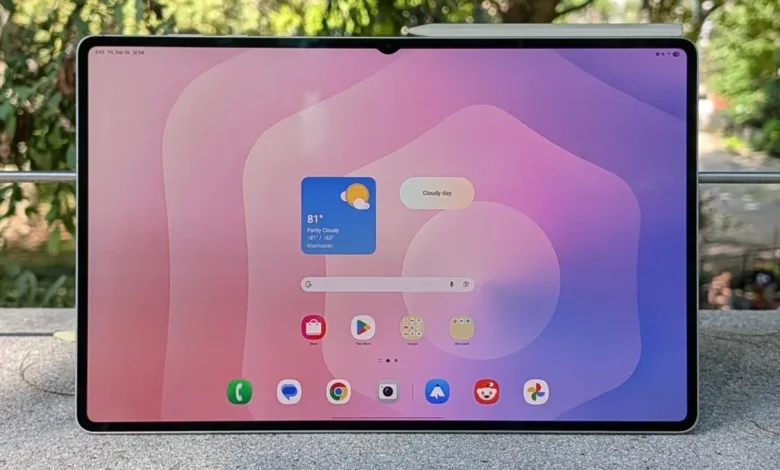
Samsung’s latest entrant in the premium tablet arena, the Samsung Galaxy Tab S11 Ultra, is designed not merely as a larger iPad alternative, but as a full-blown mobile workstation. With a massive 14.6-inch Super AMOLED display, ultra-slim 5.1 mm chassis, and a suite of productivity features including S Pen support and full DeX desktop mode, this flagship tablet pushes the boundaries of what Android devices can achieve. That said, such ambition comes with size, weight, and price trade-offs that potential buyers must weigh carefully.
Key Specifications
According to Samsung’s official spec sheet and hands-on previews:
-
Display: 14.6-inch Dynamic AMOLED 2X, 120 Hz refresh rate, anti-reflective coating. Samsung it+2Notebookcheck+2
-
Processor: MediaTek Dimensity 9400+ built on a 3 nm architecture. Android Central+2Android Headlines+2
-
Memory/Storage: Up to 16 GB RAM / 1 TB storage; microSD expansion up to 2 TB in some variants. PhoneArena+2PhoneArena+2
-
Battery & Charging: 11,600 mAh battery in Ultra model, 45 W wired charging. Tech Advisor+1
-
Build & Features: Armor Aluminum frame, IP68 rating, S Pen included. Tech Advisor+1
-
Software: Ships with Android 16 and One UI 8 for tablets including enhanced DeX productivity mode. Tech Advisor+1
What Stands Out
Display & Visual Real Estate
The marquee highlight is undeniably the 14.6-inch panel: one of the largest tablet displays available. With 120 Hz refresh and an anti-reflection layer, it offers exceptional clarity, smooth motion and vivid colour that truly shines for media, creative work and multitasking. Reviewers praised it as “almost laptop-like” in size and capability. PhoneArena+1 For anyone seeking a large canvas for productivity, drawing or video editing, this is arguably the best Android tablet option available.
Productivity & Software Integration
Samsung has blurred the line between tablet and PC with DeX mode, allowing full desktop-style windows, drag-and-drop between apps, and even extended monitor functionality. One UI 8 on Android 16 supports multitaskers with free-floating windows and productivity features. The bundled S Pen adds stylus input for creators and note-takers. Several hands-on impressions noted how the Tab S11 Ultra becomes a viable “laptop replacement” for many users. AllABOUTECH+1
Performance & Specs
Equipped with the Dimensity 9400+ 3 nm chip, the Tab S11 Ultra delivers substantial performance gains over its predecessor. Leaks suggest strong benchmark numbers and efficient power usage. Android Central+1 Multitasking, split-screen operation and demanding apps run without notable lag. The large RAM/storage options and microSD expandability make it future-proof for creators or professionals.
Build, Features and Ecosystem Fit
Despite the giant screen, Samsung keeps the tablet impressively thin (5.1 mm) and uses a premium aluminum frame with IP68 rating. The inclusion of the S Pen, in-screen fingerprint sensor, Wi-Fi 7 / 5G (varies by market) and quad-speaker setup round it out as a premium experience. Tech Advisor+1
Where It Falls Short
Size, Weight and Portability
The Tab S11 Ultra is large—measuring roughly 326 × 208 mm and weighing around 689 g in the Wi-Fi variant. PhoneArena+1 For one-hand use, handheld reading, or small-space setups, it feels more like a lightweight laptop than a portable tablet. Some reviewers coined it “a tablet you need to pick a spot for” rather than carry casually.
Camera & Accessory Ecosystem
While not primarily aimed at photography, some reviewers noted that the camera system, though competent for a tablet, doesn’t match top smartphone-level imaging performance. Notebookcheck+1 Also, to get the full laptop-replacement experience you’ll likely need accessories (keyboard cover, external monitor support) which add to cost.
Price & Value Positioning
With premium specs comes premium pricing. This tablet is positioned at the very high end of the market—which is fine if you’ll utilise all its features, but for casual tablet users the cost may be harder to justify.
Verdict: A Laptop-Grade Tablet for Power Users
The Galaxy Tab S11 Ultra is more than a mere upgrade—it’s Samsung’s statement that tablets can be full workstations. If you’re a creator, professional, student, or enthusiast who uses extensive multitasking, drawing, video editing or productivity workflows, this device checks nearly all boxes.
Buy it if you:
-
Want the largest and most capable Android tablet available.
-
Use your tablet for professional or creative work and will benefit from the S Pen, DeX and large screen.
-
Want premium materials, build and the full Samsung ecosystem experience.
Consider alternatives if you:
-
Prefer a more portable, handheld-level tablet for casual use.
-
Don’t utilise laptop-style workflows and value mobility more than screen size.
-
Are budget conscious and want excellent performance for less.
Final Score: 9.4/10
Pros: Huge, premium display; top-tier performance; productive software/DeX support; S Pen included; premium build.
Cons: Large footprint, heavier than typical tablets; extremely high price; camera and portability trade-offs.
In summary, the Galaxy Tab S11 Ultra isn’t for everyone—but for those who demand the best of Android tablets and are willing to embrace its size, it may well be the ultimate mobile workstation you can buy today.


